A Jali TV unit is designed by you online and made to measure in our workshop in Kent. You choose the exact width, height and depth, how much space the TV gets, the shelves, the doors, the handles and the finish, and we cut, build and paint it to order. Made-to-measure TV units start from £800.
This guide walks you through the Jali Designer step by step, then answers the questions we’re asked most about TV units.
TV units at a glance
- Made to your sizes: any width from 400 mm and any height from 400 mm up to 3 metres, to fill an alcove, a chimney breast wall or a whole room.
- Price: from £800. The designer shows the exact price as you design.
- Finishes: 24 Jali top coat colours, oak veneer, white primer ready for you to paint, or natural MDF (We also do custom colours, to enquire about those just give us a call).
- Doors: solid, shaker, or fretwork in 12 patterns, hinged left, right or as double doors, or open shelving with no door.
- Handles and hinges: 8 handle styles or no handles, with bronze, brass or nickel-plated hinges.
- Made in Kent: every piece is cut to the millimetre on our CNC machines and finished by hand.
- Delivery: free to most of mainland England. Hard-to-reach areas and addresses outside England pay a delivery charge, which we confirm before your order is made.
How to design your made to measure TV unit
Step 1: Open the designer
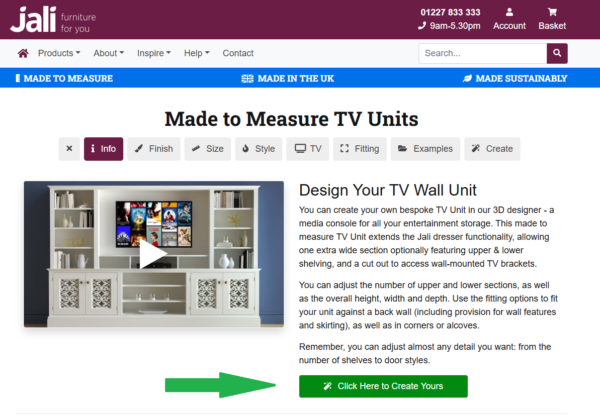
Visit the TV Units page on the Jali website. Scroll down to see examples that are ready to buy or customise, or click the green Click Here to Create Yours button to start your own design.
Step 2: Choose your finish
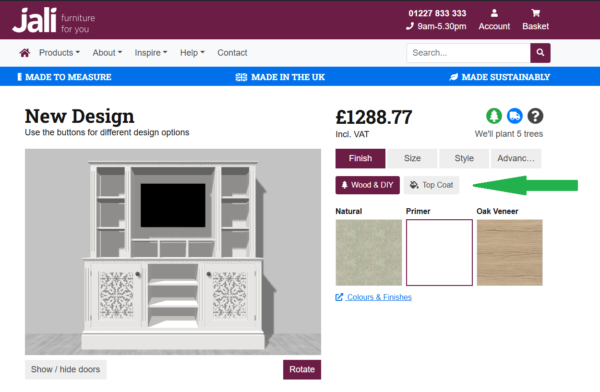
The designer opens on the Finish menu. Under Wood & DIY you’ll find natural MDF, white primer and oak veneer. Click Top Coat to see all 24 Jali colours. Click a swatch to see your TV unit in that finish. The price updates as you go.
Step 3: Set the overall size
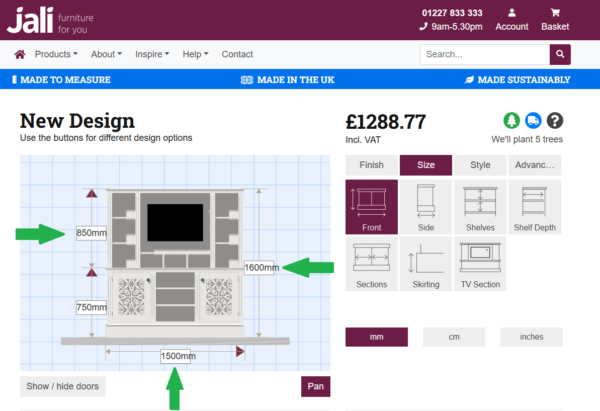
Click Size, then Front. Enter the width of your wall or alcove and the height you’d like. Then click Side to set the depth: the lower cupboards and the upper shelves each have their own depth, so the shelves can be shallower than the cupboards below.
Step 4: Make room for your TV
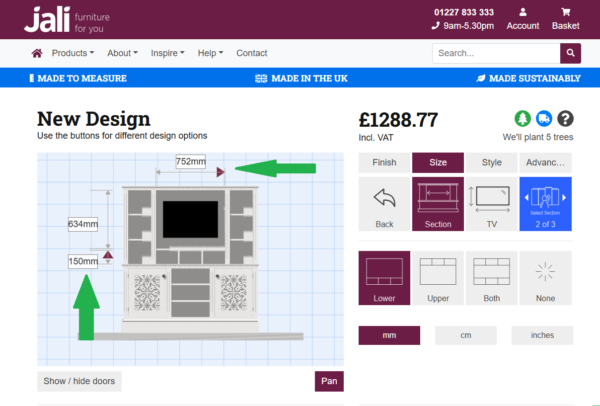
Still in Size, click TV Section. Choose which section the TV sits in, and make that section wider or taller. Then click TV and enter your TV’s actual width and height, so you can see exactly how it will fit. Measure the TV itself rather than going by its screen size in inches, as the frame and stand add to it.
Step 5: Arrange the sections
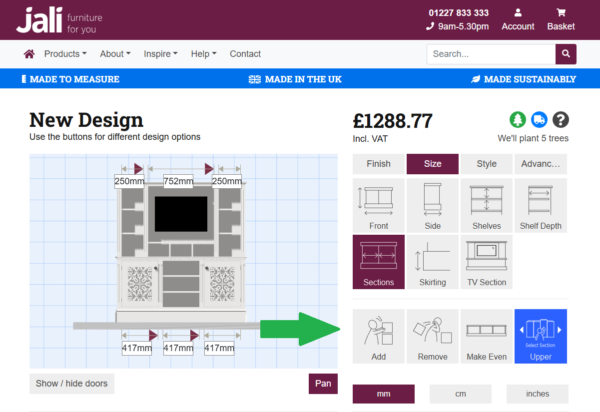
Click Sections to add or remove sections, drag each one wider or narrower, or press Make Even to space them equally. You can set the lower cupboards and the upper shelves separately.
Step 6: Place the shelves
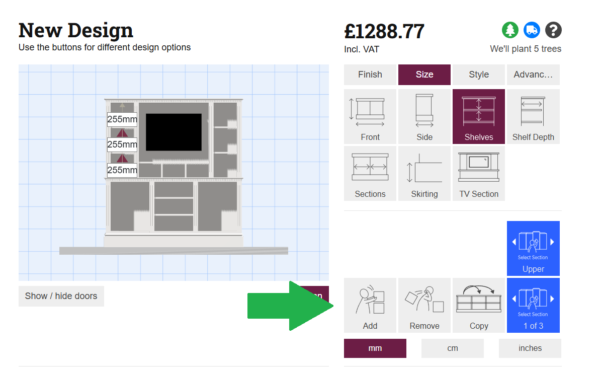
Click Shelves. Choose a section, then add, remove or move each shelf to the height you want. Use Copy to give other sections the same layout, and Shelf Depth to change how deep the shelves are.
Step 7: Choose your doors and handles
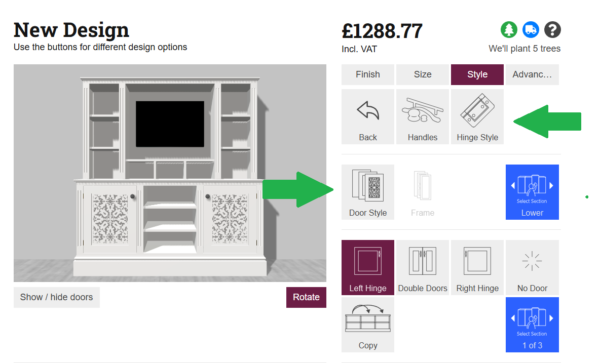
Click Style, then Doors. For each cupboard, choose a left hinge, right hinge, double doors, or no door at all. Under Door Style, pick solid, shaker or fretwork. Shaker doors can have a cut-out detail (circle, squares, diamond, heart, tulip or droplet), and fretwork comes in 12 patterns. Then click Handles to choose from 8 handle styles or no handles, and Hinge Style for bronze, brass or nickel-plated hinges.
Step 8: Add the finishing touches
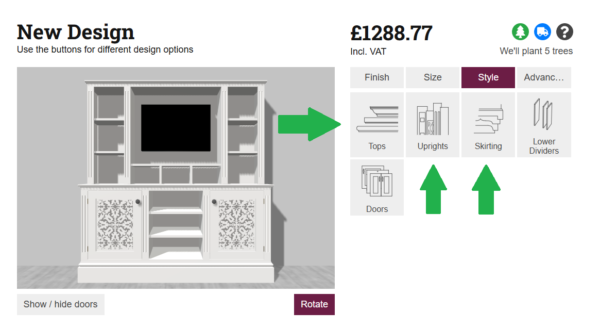
Still in Style, choose the Tops (square, bullnose or Roman ogee edge), the Uprights and the Skirting along the bottom.
Step 9: Fit it to your room
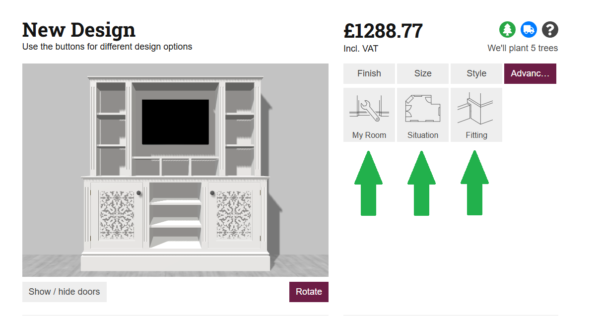
Click Advanced, then My Room and Fitting, to tell the designer about your room’s skirting board so the unit is made to fit neatly around it.
Step 10: Save or order
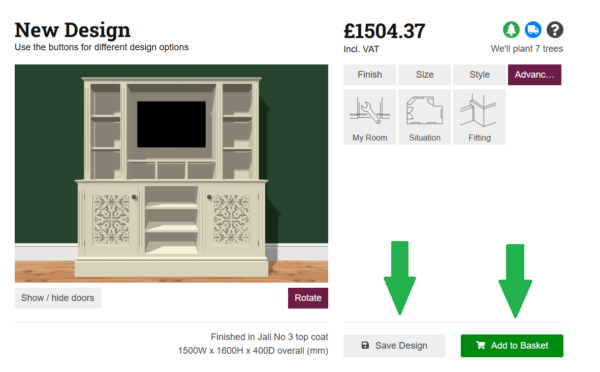
Click Save Design to keep your design and come back to it any time, or Add to Basket when you’re ready to order.
Questions we’re asked most
How do I make the TV space bigger for a larger TV?
In the designer, click Size, then TV Section. Choose the section your TV sits in and make it wider or taller. Then click TV and enter your TV’s actual width and height to check it fits with room to spare.
Can I mount my TV on the wall behind the unit?
Yes. In the designer, click Size, then TV Section, then TV, and choose Cutout. This cuts an opening in the back of the TV section so you can reach a wall-mounted TV bracket. You can set the size and position of the opening to suit your bracket.
What colours do you offer?
There are 24 Jali top coat colours to choose from in the designer, as well as oak veneer. You can see each colour on your design as you choose it. If you’d like to see a colour in person first, call us about paint samples.
What finishes can I choose?
Four: top coat (fully painted in one of our colours, ready to use), oak veneer (real oak wood), white primer (primed and ready for you to paint in your own colour), or natural MDF (unfinished, for you to prime and paint).
How do I change the doors?
Click Style, then Doors. For each cupboard you can choose the door style (solid, shaker or fretwork), hinge it on the left or right, use double doors, or leave it as an open shelf with no door.
What handles can I have?
There are 8 handle styles, or no handles at all, and you can set where the handles sit on each door. Hinges come in bronze, brass or nickel-plated.
What size can a made to measure TV unit be?
Any width from 400 mm, so it can fill an alcove or run the whole length of a wall, and any height from 400 mm up to 3 metres. Every section can be a different width, and the lower cupboards and upper shelves can be different depths.
How many drawers can I have?
DRAWERS-ANSWER
Can I change the shelf heights?
Yes. Click Size, then Shelves. Choose a section and add, remove or move each shelf to the height you want. Use Copy to give other sections the same shelf layout.
How do I measure for a TV unit?
Measure the width of the wall or alcove at the bottom, middle and top, and use the smallest, as walls are rarely perfectly straight. Measure the height to the ceiling or to where you want the unit to stop, and check for skirting boards, sockets and radiators.
Do you deliver to me?
Delivery is free to most of mainland England. Hard-to-reach areas and addresses outside England, including Scotland, Wales, Ireland, Jersey and Guernsey, pay a delivery charge. We’ll always confirm the delivery cost with you before your order is made.
Ready to start?
Design your made to measure TV unit online now, save it, and come back to it whenever you like. If you’d rather talk it through, call us on 01227 833333.